
Invalid drive specification
- This topic has 28 replies, 5 voices, and was last updated 1 month, 3 weeks ago by
 No More Pirates.
-
No More PiratesParticipantAugust 20, 2026 at 4:31 am #12149Greeting!
Running Dos-6.22 and I have “MS Book Shelf 87 (for DOS)” Installed on a CD that I
want to install and run on my DOS OSMy current CD-ROM drives are labelled as E:\ and F:\. But whenever I try to load them I
get the message “invalid drive specification”. Anyone know how to fix this please?Thanks
No More PiratesParticipantAugust 20, 2026 at 7:21 pm #12153I am not quite sure what you mean! But Drive E is a “super write master” and SATA port. And Drive F is a “compact disk re-writer and DVD ROM” on IDE port

dr_stParticipantAugust 22, 2026 at 5:56 pm #12163I think this was supposed to have been posted in the DOS Talk or Support forums, and not here, since it has nothing to do with Abuse.
By the answer I also assume OP does not know how CD drives work in DOS. They do not work out of the box. You need to install a CD driver in CONFIG.SYS, then run a CD extender program (MSCDEX or SHSUCDX or the like) in AUTOEXEC.BAT.
August 22, 2026 at 7:41 pm #12164Yeah, I think you’re right, dr_st.
You need to load a driver in order for a CD-ROM drive to work in DOS. It’s not plug & play. You’ll need to find a driver for your drive and install it.
August 22, 2026 at 7:47 pm #12166Oh and I’ve also moved it to the DOS Talk forum, since it’s about general DOS stuff 🙂
No More PiratesParticipantAugust 22, 2026 at 9:54 pm #12167Do you know where I cold find a driver to install for this please? and how do you open CONFIG.SYS to do this?
Where would I get MSCDEX or SHSUCDX from?
There is no AUTOEXEC.BAT in my HDD!
DJ_HiPParticipantAugust 22, 2026 at 11:19 pm #12168Ah excellent, now we have a little more context 🙂
In DOS you need to provide little drivers for most hardware items as they are not inbuilt (cdrom/mouse/sound)
Often the generic CD-ROM driver ‘oakcdrom’ does the job.
What type of system are you attempting this on?
Is this your daily gaming computer you are trying to dual-boot DOS? Or a virtual machine?
(A quick setup mothod could be using the utility from bootdisk.com see: https://www.bootdisk.com/readme.htm#cdromdos )
Attachments:
No More PiratesParticipantAugust 23, 2026 at 6:57 am #12175Its a daily use machine with a win-xp partition and a DOS partition on it
So in the link https://www.bootdisk.com/readme.htm#cdromdos you need to download the doscdrom.exe for this to work right? Following that link to this page
https://www.bootdisk.com/popfiles.htm they state the following “So in response I’d like to request that you if you need these files that you help me out for my time and expenses for just $4 to get access to EVERY file below” and at the bottom of the page it states “Click the button below to Checkout via PayPal to get access to ALL the above files. Please note that you do not need or setup a new paypal account to pay with a credit card” I dont have a paypal account and I dont see an option for paying with a credit card either!
dr_stParticipantAugust 23, 2026 at 11:01 am #12178There are many ways to get those file.
MSCDEX.EXE is part of DOS. If your DOS copy came from a complete installation, you should have it, under C:\DOS.
On most of my machines, I’ve been happily using VIDE-CDD.SYS driver. It has a very small memory footprint, and is very compatible. Although not 100% compatible, it works with most drives and most programs. You can get it, for example here:
https://vogonsdrivers.com/getfile.php?fileid=1456
DJ_HiPParticipantAugust 23, 2026 at 11:58 am #12180Oh sorry, this is the link to the DOScdrom utility; https://www.bootdisk.com/3077/doscdrom.exe
The original creator of that site has passed away a few years ago, it’s a historical site now.
No More PiratesParticipantAugust 23, 2026 at 12:34 pm #12182I have found it! its located C:\DOS\MSCDEX.EXE Should I reboot into DOS and run it?
From that link https://vogonsdrivers.com/getfile.php?fileid=1456 I downloaded “apicd214”
Is this the right file? If so then should I write to floppy then I reboot to DOS then run the SETUP (bear in mind that this is SETUP and SETUP 2 in the folder)
No More PiratesParticipantAugust 23, 2026 at 12:39 pm #12183Im sorry to hear that!
For the download link from
https://www.bootdisk.com/3077/doscdrom.exe
I have downloaded it. Again as above should I write it to floppy and reboot machine to DOS and run it?
No More PiratesParticipantAugust 23, 2026 at 3:47 pm #12184So I gave the 3 downloads a try and wrote them to floppy and booted DOS
OAKCDROM SYS Says that it is an “invalid drive search path. Bad command or file name”
DOSCDROM EXE says that “this program can not be run in dos mode”
APICD214 SETUP EXE Did indeed boot a program and gave me 2 options of first express setup. And second custom set up where you specify the drive. I Chose the first and it installed. Checked it and I have a Bootable D drive that works!
However in my windows manager. Drive C is the DOS partition. D is the windows partition, E is my CDROM IDE drive, and F is my SATA CDROM drive. When in DOS it did not detect my SATA drive hence it did not detect an E drive
So I went back to manual/ custom install the APICD214 SETUP EXE floppy disk. and the options where as followed
1F0 IDE port 1rQ#
1F0 IDE port 1rQ#
1E8 IDE port 1rQ#
168 IDE port 1rQ#
Note non of them are sata!
DJ_HiPParticipantAugust 23, 2026 at 9:51 pm #12188What motherboard do you have, and are all the devices you are using plugged into the motherboard direct or is there another plug in controller?
No More PiratesParticipantAugust 23, 2026 at 9:59 pm #12189I do not know much about the MB
I think its an ACRAS brand. pentium 4. DDR400 RAM with 4 slots. 1 IDE port and 4 SATA portsAnd it has a multi bus port on the back with the following bus ports. COM (printer). Phono (audio, broken) PS2 (broken). USB and LAN, 3.5mm audio (broken)
No More PiratesParticipantAugust 23, 2026 at 10:20 pm #12190On that note.. from reading this page
https://www.bootdisk.com/popfiles.htm
Since they are no longer with us, sending an email or a $4 payment would be pritty pointless. So is it possible to get the following
Custom XP Fresh Install Bootdisks (for when I have trouble installing win-xp from CD again)
NTFS Read/Write Bootdisk And Bootable CDs (for when I have trouble trying to format NFTS to FATs)
DOS USB Driver (so I can run USB memory sticks on DOS)
Finally dose anyone know if I can get a COM port to audio adapter (so I can get sound though my COM port, since my sound ports are broken, and the sound drivers I have only work on win-xp)
Thanks
DJ_HiPParticipantAugust 23, 2026 at 11:18 pm #12191For the files, they are all here: https://www.bootdisk.com/3077/
As for your Motherboard, I wonder if it’s either a RAID or ACPI drive setting that the SATA ports are configured behind, as many of those early boards did not present SATA in a supported fashion while everyone was on IDE still. So it may be a BIOS setting required to put the ports into a supported mode for MS-DOS.
No More PiratesParticipantAugust 24, 2026 at 12:38 pm #12194I dont know what RAID or ACPI are but should “usbdrive.zip” get the usb ports working in DOS?
DJ_HiPParticipantAugust 24, 2026 at 12:51 pm #12196It might be possible, but now that I understand what you are attempting to do, you are hitting the limitations of MS-DOS.
A Pentium 4 is many generations too new for MS-DOS.
486, Pentium 1 & 2 were MS-DOS generations. Pentium 3 will run DOS but was released after Windows 98 came out.
Pentium 4 were mostly released once Windows XP was out, so MS-DOS drivers and compatiblity is very limited with many hardware items having no support at all.
All is not lost, I would encourage you to look into FreeDOS, this has a far wider compatibility range with hardware as it is still in development.
No More PiratesParticipantAugust 24, 2026 at 5:20 pm #12206This MB was manufactured in 2004 (according to the BIOS) which was the peek of
win-xp. Its the Pentium 4 duel core you have to watch out for! they are 64 bit, and as
someone the other day was telling me that 32 bit software dose not run well on 64bit
systems!To my knowlage win-3.1 was 16bit and win-95 was 32bit. I am running DOS-6.22, the
latest one they did on its own, then next one was MS-DOS-7.0 which was included in
Windows 95. So it is a common presumption that DOS-6.22 was 16bit. But 16bit
software dose run on 32bit systems. As I have a few of them running on my win-xp
machine
DJ_HiPParticipantAugust 24, 2026 at 10:03 pm #12209You are correct with the Operating System subsystems, but the limitation on running the 16bit programs is down to the Operating System and not the CPU.
A 64bit CPU can still run a 32bit Operating sytem which supports 16bit applications. 🙂
The problem is the manufacturers stop making drivers for the older Operating Systems so you cannot get a new (for example Core Ultra 7) system running fully on Windows XP as no drivers exist for the hardware.
In your situation what I would recommend is running the Pentium 4 in native Windows XP, then running up Dosbox for all you Dos gaming, then you get the best of both worlds without needing to get stuck with native DOS issues.
For a great simple start to using Dosbox with raw DOS files you can check out this short Youtube clip: https://www.youtube.com/watch?v=NIh4GY_TIns
No More PiratesParticipantAugust 25, 2026 at 8:19 am #12211I once had a 64bit processor running 32 bit programs
I guess running it at 32bit you are only getting half the use out of the processor I mean.
if one terminal results in 0 or 1 then thats 2bits of information for choice
If you add another terminal so you have 2 terminals then that 2bit of information times by 2 = 4bits
And now a 3rd terminal, so 4bits of info times 2= 8bits
And now a 4th terminal, so again 8bits times 2= 16 bits
And now a 5th terminal, so again 16bits times 2= 32 bits
And finally a 6th terminal, so 32bits times 2=64bits
Every time we add a new terminal we double the amount of data we can have1. 1 (2bit)
2. 01(4bit)
3. 001(8bit)
4. 0001(16bit)
5. 00001(32bit)
6. 000001(64bit) so a 32bit OS running on this CPU hear, will not use this terminal
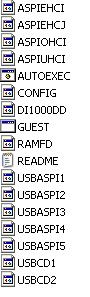
No More PiratesParticipantAugust 25, 2026 at 2:42 pm #12223I have just downloaded and copied to floppy the ” usbdrive.zip”. But I do not see an installer. please see the attachment
I have tried AUTOEXEC and it keeps asking me to insert a win-98 disk. The read me file is as follows
———————-
This pack contains:5 different usbaspi drivers labled usbaspi1.sys through usbaspi5.sys
2 different usbcd drivers labled usbcd1.sys and usbcd2.sys
1 ram drive floppy driver called ramfd.sys
aspiehci.sys and guest.exe
A replacement config.sys and autoexec.bat file for win98 OEM disks for
loading up USB CDrom drives and/or a ram floppy drive.
——————-Any ideas on how to install it onto DOS please?
Attachments:

ssybesmaParticipantAugust 29, 2026 at 6:45 pm #12245For MS-DOS, the config.sys and autoexec.bat are in the root of your C: drive unless you deleted them. The device driver that goes into config.sys and the executable that assigns the drive letter that goes into autoexec.bat are available at many sites that offer files for DOS especially archive.org
ssybesmaParticipantAugust 29, 2026 at 6:49 pm #12246MSCDEX.EXE must be included as a command line with a switch to assign the drive letter and that command line goes into AUTOEXEC.BAT in the root of your C drive.
No More PiratesParticipantAugust 30, 2026 at 12:46 pm #12252Can you show me the command line please?
dr_stParticipantAugust 31, 2026 at 6:28 am #12258Something like
MSCDEX /D:driver /L:letter
where ‘driver’ is the exact name for the driver you’ve used in CONFIG.SYS, and letter is the letter you want to assign to the first CDROM.So for example if in CONFIG.SYS you’ve used VIDE-CDD.SYS like this:
DEVICEHIGH=C:\DOS\VIDE-CDD.SYS /D:IDECDROM
You would launch MSCDEX.EXE in AUTOEXEC like so:
LH C:\DOS\MSCDEX.EXE /D:IDECDROM /L:EThe drive letter is optional (I used E because this is what you told me about your CDROM drives in Windows). If you don’t specify the /L: switch, it will assign the first CDROM to the first available drive letter after all your hard disk partitions.
No More PiratesParticipantAugust 31, 2026 at 2:59 pm #12261I managed to get the CD rom drive working form a file I found somewhere hear. But it is the USB that is not working!
Will either of these to work
DEVICEHIGH=C:\DOS\VIDE-CDD.SYS /D:IDECDROM
LH C:\DOS\MSCDEX.EXE /D:IDECDROM /L:E

You must be logged in to reply to this topic.
