No More Pirates
Forum Replies Created
-

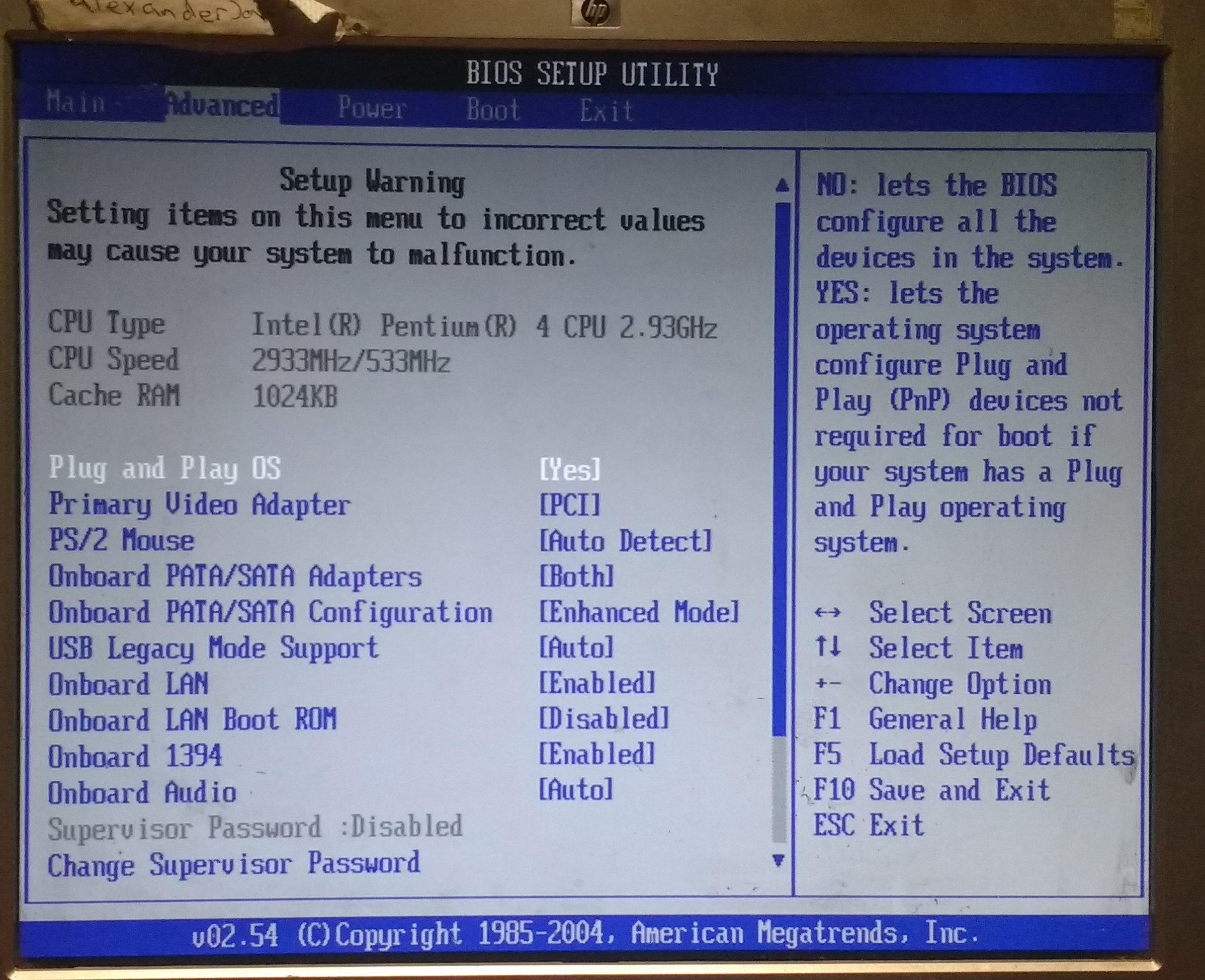
No More PiratesParticipanti have uploaded an attachment of the BIOS
Hope this helps!Attachments:
No More PiratesParticipantSeptember 10, 2026 at 7:06 am #12357 Reply
Definitely 110% agree with the recommendation to emulate. DOSBox is great, and it will run on something as humble as Windows 9x (allegedly).
And if you’re willing to get a bit more technical PCem or 86box are arguably even better (but with more demanding system requirements).Close second best option is a program called Moslo:
http://hpaa.com/moslo/moslo.asp
It’s been a long time since I’ve used it, but it’s something you can run from the command line in native DOS or from inside Windows to eat up your computer’s cycles and slow down games.
************************
Do you think it will install on DOS 6.22?
No More PiratesParticipantI saw on ebay a while ago someone selling the mother board bases for 8088/ 8066 CPUs. bread boards i think they called them. they where about just over a fiver! But you had to get all the components for them
No More PiratesParticipantIf you have ever sen the 8 Bit Guy on YouTube then you will see he mails back to them quite often
I read on duckduckgo that it is possible to slow the clock speed down of the CPU.
Failing that then should I look for a new motherboard with 8086/ 8888 or 284 processor?
No More PiratesParticipantits a 775 socket MB. I dont know what speed it it. but I do happen to have 2 spare 775 processors
The first one is a celeron D 336 and is based on the prescott arch. So basically first gen socket 775 material 2.80GHZ. which I know dose run the MB
And the second one is a pentium D 945 is a pressler dual core 3.4GHZ. Which WONT run on this MB
So you bough think it is a processor issue and not a RAM or game issue then?
So if it supposed to run at 4 and 12 MHz. Then we are about 500 times faster then that! Again wonder if can change settings in BIOS
No More PiratesParticipantim not sure what speed this processor is but its a pentium 4. is there any way I can slow it down in the BIOS?
Also did you not read my entire thread? I said i was in the UK and did not have capacity to dial outside of the uk even to europe never mind america. can you do this for me please? (if you are in america that is)
Thanks
No More PiratesParticipantit says in the above test
*******************
IF YOU FIND ANY BUGS, CALL
DAVID TRETTER AT (301) 622-3976
****************************I think its a America phone number. I am in the UK and dont have capacity to call outside of the UK
So if someone could do it for me and post back then I would appreciate it very much!
Thanks
No More PiratesParticipantPS
I just read the readme notes/ .TXT file in the downloaded file which quotes the following
**************************************************
ARIO BROS BY: DAVID TRETTER 1983THIS GAME CLOSELY FOLLOWS THE ARCADE GAME AFTER WHICH IT IS MADE. IT
WILL RUN ON BOTH COLOR AND MONO SYSTEMS, WITH JOYSTICK OR KEYBOARD CONTROLS.
THE FIRST LEVELS ARE VERY SLOW, BUT IT GETS FASTER. IF YOU FIND ANY BUGS, CALL
DAVID TRETTER AT (301) 622-3976. NOTE:THIS GAME SHOULD BE COMPILED.OBJECT: TO GET POINTS WHILE KEEPING THE PLUMBING CLEAR OF PESTS.
FOR KEYBOARD CONTROLS, YOU USE THE ASD KEYS TO MOVE AND THE SPC TO
JUMP. ON THE JOYSTICK, THE BUTTONS JUMP. YOU TEMPORARILY FREEZE PESTS BY
JUMPING UP AND HITTING THE LEDGE RIGHT UNDER THEM. THEN JUST RUN UP AND GET
THEM. THE SECOND GROUP OF PESTS NEEDS TO BE HIT TWICE, WHILE THE THIRD GROUP
JUMP. AFTER YOU GET A PEST, A SMALL COIN WILL APPEAR. GET THE COIN FOR
POINTS. THE BOX ON THE SCREEN IS CALLED POW. WHEN YOU HIT IT, IT IS LIKE YOU
JUMPED UP AND HIT THE WHOLE SCREEN AT ONCE. THE PESTS FREEZE, AND YOU GET
THEM. THE POW GETS SMALLER EACH TIME, SO DON’T WASTE IT. THE FIREBALL KILLS
YOU, SO WATCH OUT. IF YOU HIT THE FIREBALL, YOU GET A BUNDLE OF POINTS BUT
THEN IT STARTS TO SPEED. IT SOUNDS HARD, BUT YOU’LL GET THE HANG OF IT.DAVID TRETTER
******************************************
No More PiratesParticipantI managed to get the CD rom drive working form a file I found somewhere hear. But it is the USB that is not working!
Will either of these to work
DEVICEHIGH=C:\DOS\VIDE-CDD.SYS /D:IDECDROM
LH C:\DOS\MSCDEX.EXE /D:IDECDROM /L:E
No More PiratesParticipantCan you show me the command line please?
No More PiratesParticipantI would hate to imagine how much time and quality you would get from 720KB of data in audio
If I win the bid then lets hope they will format to FAT
No More PiratesParticipantMost of them are just copies. i would not know what a rear game was anyway. but have a look at them anyway
https://www.ebay.co.uk/itm/267763391716
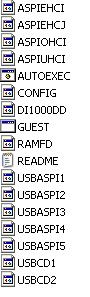
No More PiratesParticipantI have just downloaded and copied to floppy the ” usbdrive.zip”. But I do not see an installer. please see the attachment
I have tried AUTOEXEC and it keeps asking me to insert a win-98 disk. The read me file is as follows
———————-
This pack contains:5 different usbaspi drivers labled usbaspi1.sys through usbaspi5.sys
2 different usbcd drivers labled usbcd1.sys and usbcd2.sys
1 ram drive floppy driver called ramfd.sys
aspiehci.sys and guest.exe
A replacement config.sys and autoexec.bat file for win98 OEM disks for
loading up USB CDrom drives and/or a ram floppy drive.
——————-Any ideas on how to install it onto DOS please?
Attachments:
No More PiratesParticipantI once had a 64bit processor running 32 bit programs
I guess running it at 32bit you are only getting half the use out of the processor I mean.
if one terminal results in 0 or 1 then thats 2bits of information for choice
If you add another terminal so you have 2 terminals then that 2bit of information times by 2 = 4bits
And now a 3rd terminal, so 4bits of info times 2= 8bits
And now a 4th terminal, so again 8bits times 2= 16 bits
And now a 5th terminal, so again 16bits times 2= 32 bits
And finally a 6th terminal, so 32bits times 2=64bits
Every time we add a new terminal we double the amount of data we can have1. 1 (2bit)
2. 01(4bit)
3. 001(8bit)
4. 0001(16bit)
5. 00001(32bit)
6. 000001(64bit) so a 32bit OS running on this CPU hear, will not use this terminal
No More PiratesParticipantShould I google one of these games then?
https://www.dosgameclub.com/episode-list/
I presume you dont have them hear for download that is?
No More PiratesParticipantThis MB was manufactured in 2004 (according to the BIOS) which was the peek of
win-xp. Its the Pentium 4 duel core you have to watch out for! they are 64 bit, and as
someone the other day was telling me that 32 bit software dose not run well on 64bit
systems!To my knowlage win-3.1 was 16bit and win-95 was 32bit. I am running DOS-6.22, the
latest one they did on its own, then next one was MS-DOS-7.0 which was included in
Windows 95. So it is a common presumption that DOS-6.22 was 16bit. But 16bit
software dose run on 32bit systems. As I have a few of them running on my win-xp
machine
No More PiratesParticipantbriefly looking at gog.com the games look fairly modern to me and not DOS compatible IMHO. I was kind of hopping to get them onto 3.5 floppy by way of purchase from the likes of ebay or downloading them, then writhing to disk and installing them onto my DOS 6.22 OS
No More PiratesParticipantI dont know what RAID or ACPI are but should “usbdrive.zip” get the usb ports working in DOS?
No More PiratesParticipantOn that note.. from reading this page
https://www.bootdisk.com/popfiles.htm
Since they are no longer with us, sending an email or a $4 payment would be pritty pointless. So is it possible to get the following
Custom XP Fresh Install Bootdisks (for when I have trouble installing win-xp from CD again)
NTFS Read/Write Bootdisk And Bootable CDs (for when I have trouble trying to format NFTS to FATs)
DOS USB Driver (so I can run USB memory sticks on DOS)
Finally dose anyone know if I can get a COM port to audio adapter (so I can get sound though my COM port, since my sound ports are broken, and the sound drivers I have only work on win-xp)
Thanks
No More PiratesParticipantI do not know much about the MB
I think its an ACRAS brand. pentium 4. DDR400 RAM with 4 slots. 1 IDE port and 4 SATA portsAnd it has a multi bus port on the back with the following bus ports. COM (printer). Phono (audio, broken) PS2 (broken). USB and LAN, 3.5mm audio (broken)
No More PiratesParticipantOK thanks for letting me know! will pass on this game i think
No More PiratesParticipantSo I gave the 3 downloads a try and wrote them to floppy and booted DOS
OAKCDROM SYS Says that it is an “invalid drive search path. Bad command or file name”
DOSCDROM EXE says that “this program can not be run in dos mode”
APICD214 SETUP EXE Did indeed boot a program and gave me 2 options of first express setup. And second custom set up where you specify the drive. I Chose the first and it installed. Checked it and I have a Bootable D drive that works!
However in my windows manager. Drive C is the DOS partition. D is the windows partition, E is my CDROM IDE drive, and F is my SATA CDROM drive. When in DOS it did not detect my SATA drive hence it did not detect an E drive
So I went back to manual/ custom install the APICD214 SETUP EXE floppy disk. and the options where as followed
1F0 IDE port 1rQ#
1F0 IDE port 1rQ#
1E8 IDE port 1rQ#
168 IDE port 1rQ#
Note non of them are sata!
No More PiratesParticipantIm sorry to hear that!
For the download link from
https://www.bootdisk.com/3077/doscdrom.exe
I have downloaded it. Again as above should I write it to floppy and reboot machine to DOS and run it?
No More PiratesParticipantI have found it! its located C:\DOS\MSCDEX.EXE Should I reboot into DOS and run it?
From that link https://vogonsdrivers.com/getfile.php?fileid=1456 I downloaded “apicd214”
Is this the right file? If so then should I write to floppy then I reboot to DOS then run the SETUP (bear in mind that this is SETUP and SETUP 2 in the folder)
No More PiratesParticipantIts a daily use machine with a win-xp partition and a DOS partition on it
So in the link https://www.bootdisk.com/readme.htm#cdromdos you need to download the doscdrom.exe for this to work right? Following that link to this page
https://www.bootdisk.com/popfiles.htm they state the following “So in response I’d like to request that you if you need these files that you help me out for my time and expenses for just $4 to get access to EVERY file below” and at the bottom of the page it states “Click the button below to Checkout via PayPal to get access to ALL the above files. Please note that you do not need or setup a new paypal account to pay with a credit card” I dont have a paypal account and I dont see an option for paying with a credit card either!
No More PiratesParticipantDo you know where I cold find a driver to install for this please? and how do you open CONFIG.SYS to do this?
Where would I get MSCDEX or SHSUCDX from?
There is no AUTOEXEC.BAT in my HDD!
No More PiratesParticipantI am not quite sure what you mean! But Drive E is a “super write master” and SATA port. And Drive F is a “compact disk re-writer and DVD ROM” on IDE port